For the post-code developer
Code is dead.
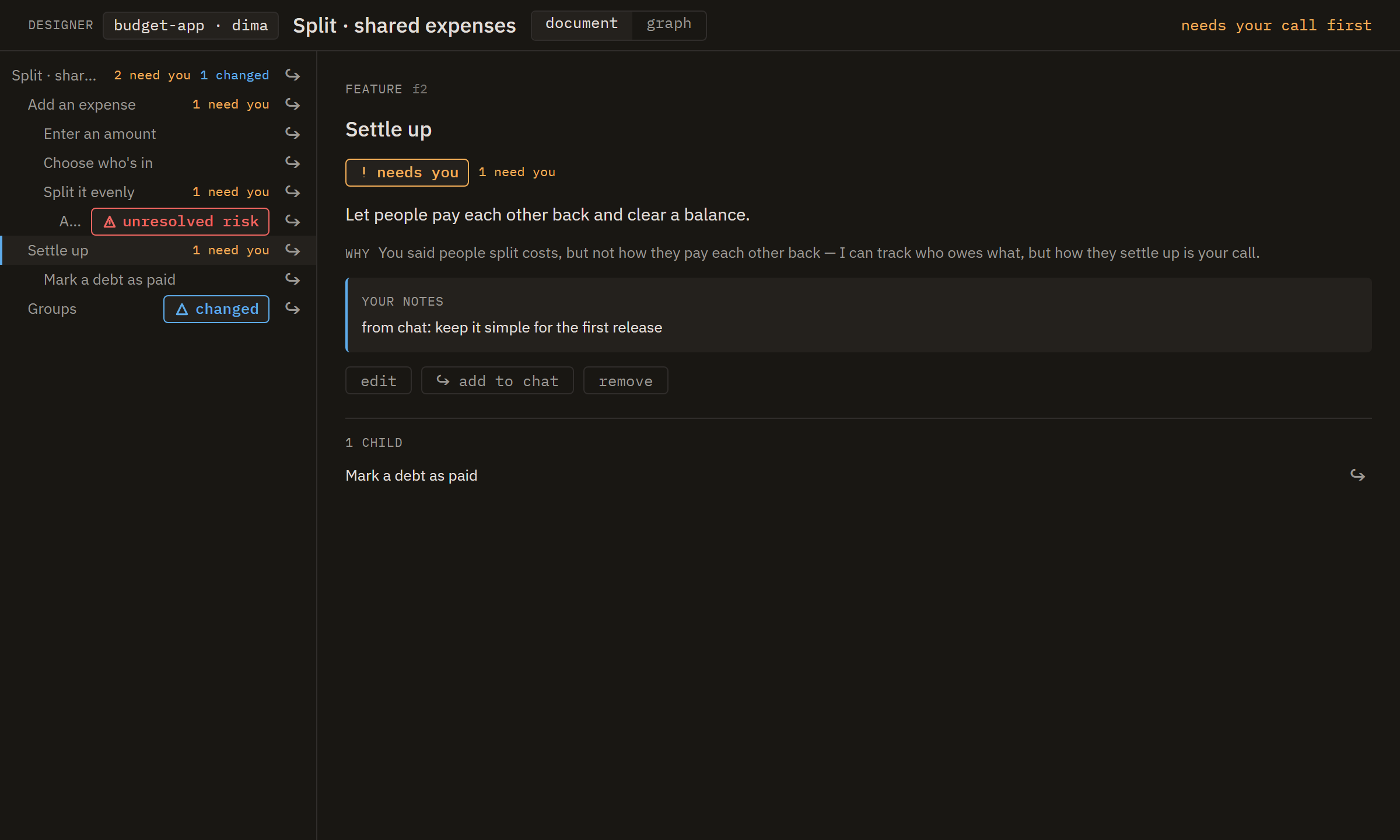
So stop reading it. Design what you want in plain language; a team of agents plans it, builds it, and checks its own work. You judge the result by running it, never by opening a file.
Proof: Panwright was built by the workflow it ships. A quarter-million lines of Rust and TypeScript, zero written by hand, in under a month. Think it’s slop? Run it.
macOS, Windows & Linux/Powered by OpenRouter or your connected AI plans
Your AI subscriptions
Use all your subscriptions in one place, all at once.
Connect the AI plans you already pay for. Their models join one picker, so every agent role and every chat can use the plan that fits it.
- AnthropicClaude Code
- OpenAIChatGPT plan
- xAISuperGrok plan
- MoonshotKimi Code plan
- MiniMaxCoding Plan
- OpenCodeGo plan
- Run them side by side. Put the planner on Claude Code, the leader on ChatGPT or SuperGrok, and the builders on Kimi, MiniMax, or OpenCode Go. Every role binds independently, and any chat can switch plans without changing the rest of the team.
- Honest about what it costs. Turns covered by a plan count as $0. If ChatGPT or SuperGrok draws on paid extra credits, Panwright reports the spend. Kimi and MiniMax stop when their allowance runs out and show you when it resets. OpenCode Go does the same unless you let it draw on your Zen balance, in which case Panwright reports what OpenCode charged.
- Your accounts, your machine. You connect to each provider directly. The credentials are stored in your operating system’s keychain and never pass through our servers.
- Claude Code keeps its own sign-in. Panwright runs the Claude Code installed on your computer, which uses the Claude subscription or API key you signed in with.
Token costs
We do better when you spend less.
OpenRouter bills its usage at cost, and connected AI plans cover eligible turns. Panwright charges a flat subscription and adds no markup to model usage.
Cloud
Your projects keep running when your computer is off.
A cloud box is a server in your own DigitalOcean account that runs Panwright. Start projects on it and steer them from your desktop or your phone. Cloud is included with Ultra.
- Set up in the app. Connect your DigitalOcean account in Settings under Cloud, choose a region and a size, and create the box. You can also create one from your phone.
- Billed by DigitalOcean. The box and its storage are in your DigitalOcean account, and DigitalOcean bills you for them at its own prices.
- Reach it from anywhere. Your desktop and phone connect to the box through our relay. The link is end-to-end encrypted, so our relay cannot read your data.
Why we built it
We spent six months inside single-chat coding assistants, 10+ hours a day. They are brilliant. They also forget what you tell them, lose the thread on long work, and either interrupt you for every small call or charge ahead for hours making calls that were yours. Panwright is what we built to fix that.
- One memory, kept by the harness. Panwright curates a single project memory instead of letting every agent keep its own notes, and surfaces only what matters for the task at hand. Explain a decision once, and every agent knows it.
- Compaction that holds. Long runs keep their thread instead of drifting as the context fills up.
- Structured workflows and audits. Work moves through real phases, and the result gets audited, not just generated.
- Agents that talk to each other. They coordinate directly instead of routing every message back through you.
- A hierarchy that shields you. Supervisors handle the routine and escalate only the calls that genuinely need you.
- Costs: Not an arm and a leg. A spread of models at different costs and strengths puts the expensive ones only where their judgment earns it.
Pan
Unlimited number of Pan chats on every plan, including Free.
Pan works like your regular ChatGPT or Claude chats. Ask it anything. Switch between your subscriptions or any Open Router model within the same conversation. When you want something built, it hands the work to a team of agents.
How it works
Three moves. No code in sight.
You design, a studio of agents builds, you verify by running it. That is the whole loop.
Design
Sketch the features and what each should do. Panwright fills in the details and flags the calls you never made, so you weigh in only where it matters.
Build
One agent plans the work and hands it out. The rest build in parallel, review each other, and test as they go. Every project remembers your decisions.
Run
No diffs to approve. Panwright shows the behaviors you asked for, working, and says in plain words what it did. Off the mark? Say what to change.
A studio, not a single bot
You talk to Pan. Under it, a studio of agents plans the work, builds in parallel, and reviews itself, the way a real team would. Step in anywhere, from your desktop or your phone.

Put your best model where it matters
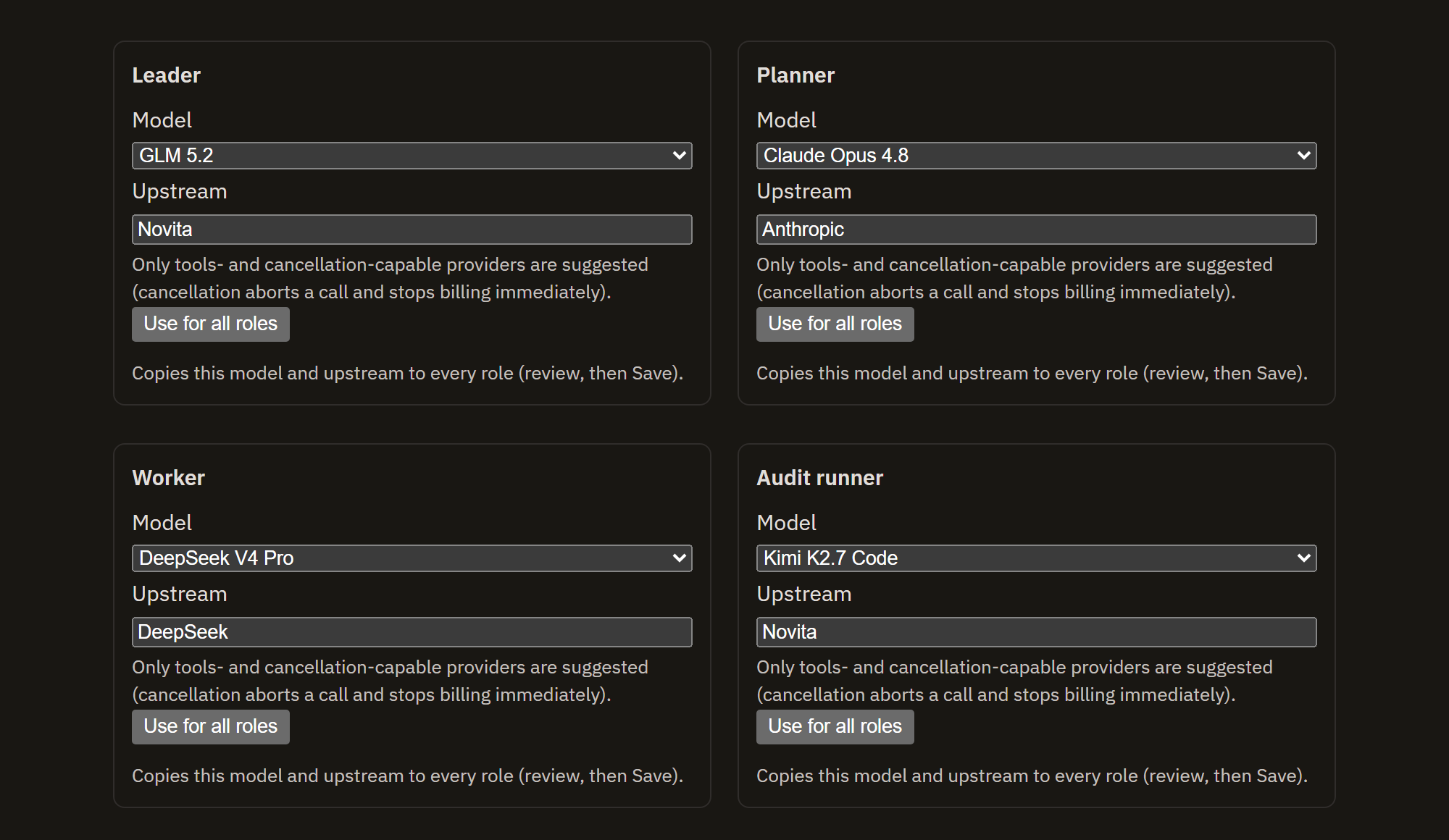
Panwright runs on OpenRouter. Connect your account and every model on it is yours to assign. Give planning and review a frontier model, where judgment earns its cost. Hand the grunt work to a fast, cheap one. Change your mind whenever. Connect your AI subscriptions and their models join the same picker, on the plans you already pay for.
Know where every dollar goes
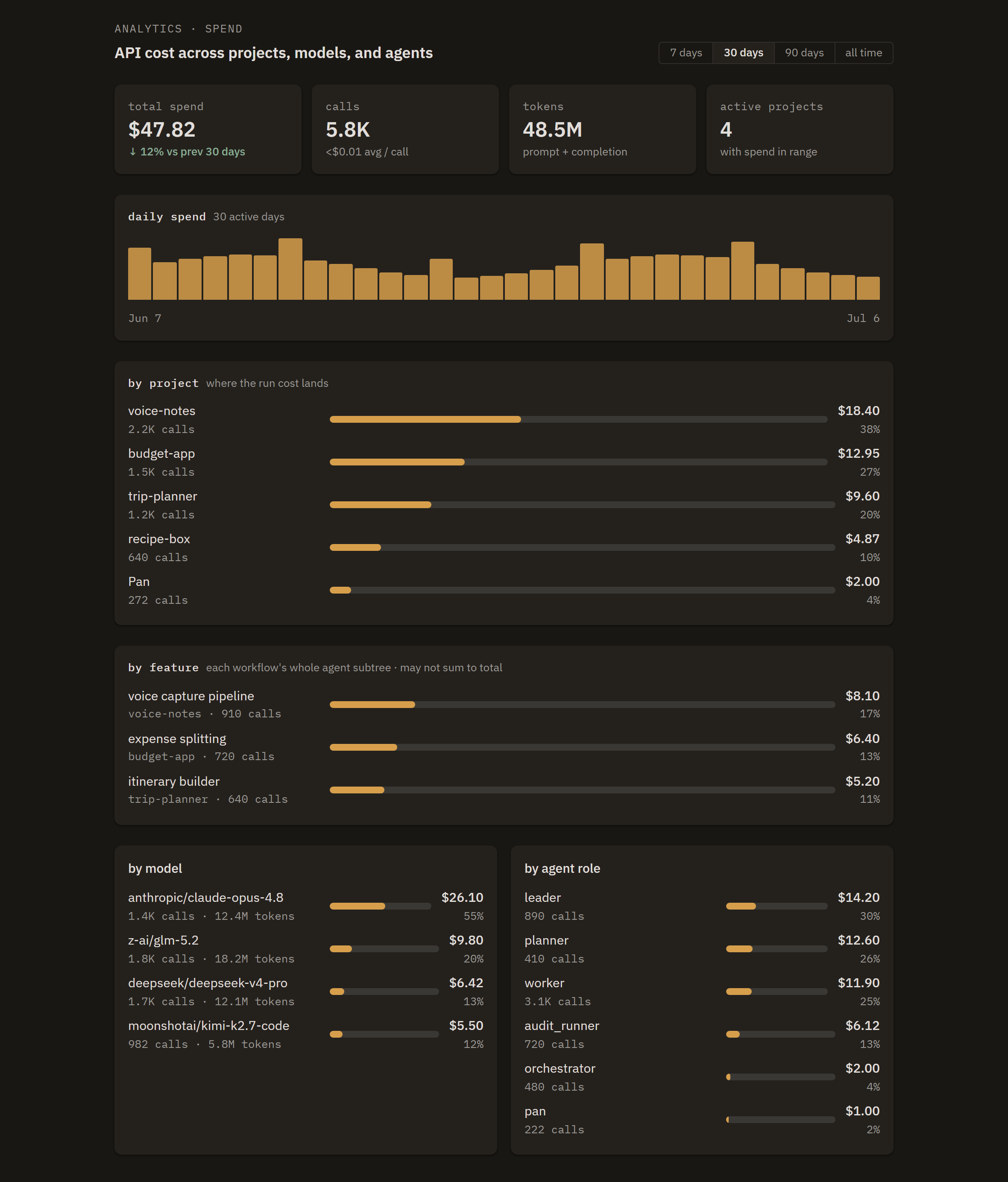
Panwright meters every call and folds it into a live breakdown: by project, by feature, by model, and by agent role. Set a spending cap and it pauses a project before it runs past it.
On your terms
Your machine. Your accounts. Your call.
Panwright runs on your computer and answers to you, not to us.
Runs on your machine
Your projects and credentials stay on your computer, or on a cloud box in your own DigitalOcean account.
Billed at cost
OpenRouter bills model usage directly at cost. We add nothing on top.
Steer from your phone
Pair your phone to follow the team and redirect it from anywhere. The link is end-to-end encrypted, so our relay cannot read your data.
Setup
Connect your accounts.
OpenRouter is required and takes about a minute to set up. Claude Code and subscriptions to ChatGPT, SuperGrok, Kimi Code, MiniMax Coding Plan, and OpenCode Go are optional, and add their models alongside it.
OpenRouter Required
-
1
Create an OpenRouter account
Free to make. It holds your models and your credits.
-
2
Connect OpenRouter
Panwright opens your browser, you approve, and the key it creates goes straight into your machine’s keychain. Nothing to copy or paste. Already have a key? Paste that instead.
-
3
Add credits on OpenRouter
OpenRouter credits pay for OpenRouter models, project memory, and web search not covered by a connected ChatGPT or SuperGrok plan.
-
4
Assign a model to each role
A frontier model where judgment matters, a fast cheap one for the grunt work.
-
5
Start building
Describe what you want and let the studio run.
AI subscriptions Optional
-
1
Connect your subscriptions
In Settings under Models, connect ChatGPT, SuperGrok, Kimi Code, MiniMax Coding Plan, OpenCode Go, or all five. You authenticate with each provider directly — OpenCode Go with the API key from its console.
-
2
Bind each role to a plan model
Every connected plan gets its own heading in the same model picker. Mix their models with one another and with OpenRouter, per role or per chat.
-
3
Watch every allowance
Panwright shows each plan’s usage window and reset time, plus purchased or Extra Usage Credits where the provider offers them.
Claude Code Optional
-
1
Sign in to Claude Code
Install Claude Code on your computer and sign in with your Claude subscription or an API key.
-
2
Run a role on Claude Code
In Settings under Models, choose Claude Code in a role’s Runs on menu, then pick a model. Panwright checks the install and sign-in at the start of every session.
Pricing
Four plans.
Choose how many projects you want to run at once.
Free
$0
1 project at a time
- Pan chatsUnlimited
- PhoneNot included
- CloudNot included
Basic
$5/ month
or $48 / year
3 projects at once
- Pan chatsUnlimited
- PhoneNot included
- CloudNot included
Pro
$10/ month
or $96 / year
10 projects at once
- Pan chatsUnlimited
- PhoneAt release
- CloudNot included
Ultra
$30/ month
or $288 / year
Unlimited projects
- Pan chatsUnlimited
- PhoneAt release
- CloudIncluded
Choose a plan in Settings → Account & billing.
Your projects stay on your machine. Changing to a lower plan keeps your current project limit through the end of the period you have already paid for, then applies the lower limit. OpenRouter bills its usage separately, and connected AI plans cover eligible turns. Billing is handled by our reseller Paddle.
Cloud boxes run in your own DigitalOcean account. DigitalOcean bills the server and its storage to you directly.
The phone companion is in review. Phone access is free during review; TestFlight access is separate. After release, phone access is included with Pro and Ultra.
Stop reading code.
Start directing the thing that writes it. Available now for macOS, Windows, and Linux.
Download